

Talkback to Text, Evolved.
Say it. Everyone reads it.
SPITT is a text-based talkback system for the live crew: speak, and your voice becomes text in a shared chat. No cloud, no app to install.
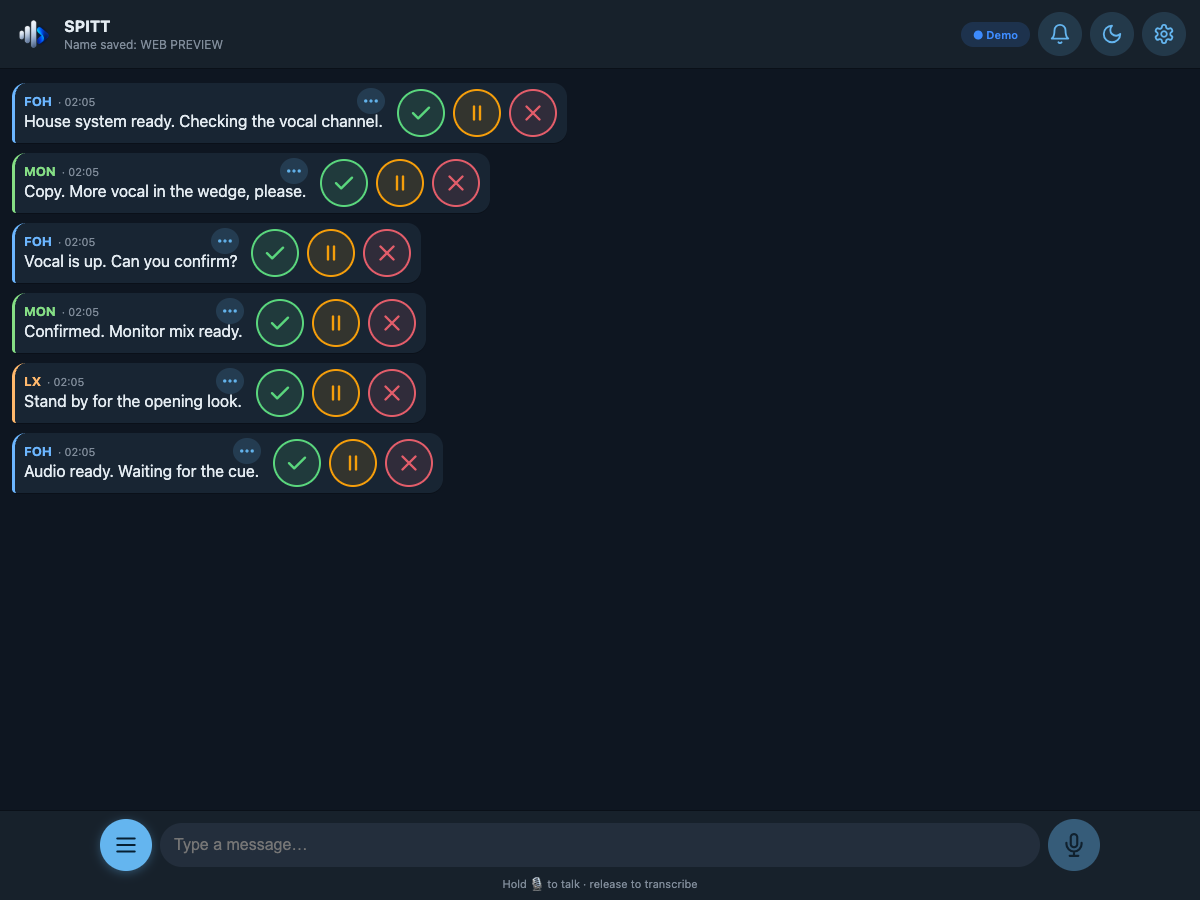
How it works

Start the server on your Mac
An Apple Silicon Mac runs the SPITT server. The Mac and the users’ devices must be connected to the same local network.

Connect clients through the browser
Each user opens SPITT in their device’s browser and enters their name and role. No app to install.

Speak to the crew
Press to talk. Your words become text in the shared chat.
Features
What SPITT does today.
Push-to-talk / open mic
Press to talk or leave the mic open: messages close after silence.
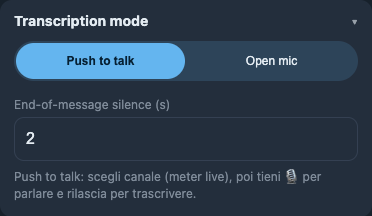
Official app · Transcription mode controls
Source & channel
Choose microphone, audio interface and input channel.
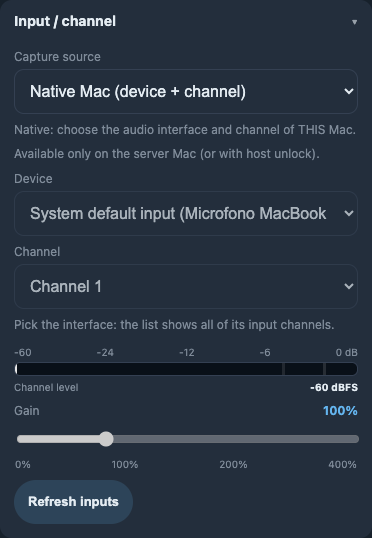
Official app · Native Mac input and channel controls
IT/EN transcription
Whisper on-device, Italian and English, boosted by a pro-audio vocabulary and phrasebook. No audio leaves the network.

Official app · Italian message with IT ↔ EN translation button · sample message
Quick commands
Copy, stand by, go: ready-to-send commands in the shared conversation.
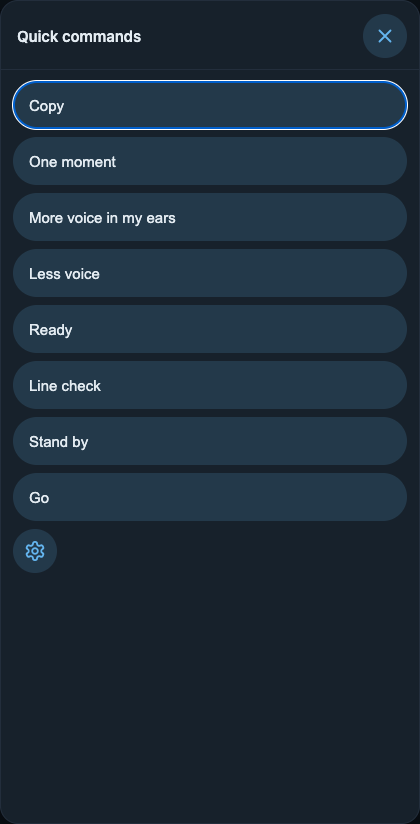
Official app · Ready-to-send quick commands
Quick Replies
Copy, stand by or no: reply directly to a message.
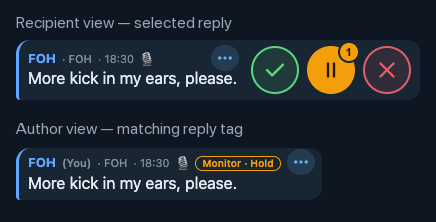
Official app · Selected Hold reply and matching author tag · sample message
Roles
Choose your name and role so everyone knows who is speaking.
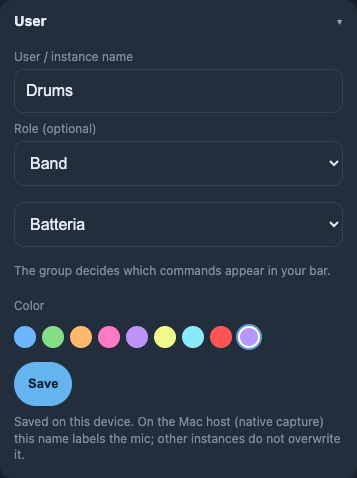
Official app · User name, group and role controls
Band Request Menu
Choose what you need and where, then tap + or − to send the request.

Official app · Band request controls: + / −, kick, in my ears
Dark Mode
Switch to stage dark mode and choose blue, green or a custom colour.
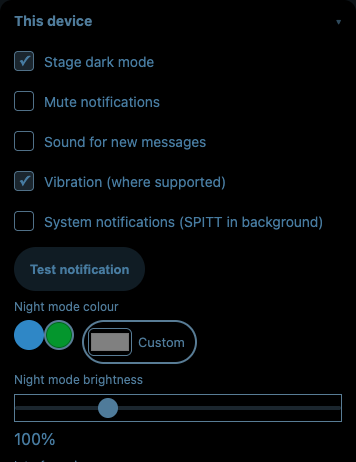
Official app · Stage dark mode enabled · blue, green and custom colours
Screenshots from the official SPITT app. Chat messages are examples.
Built for show control
The design choices, in four points.

Decentralized System
Flexible crew communication that works independently of your audio routing.

Auto Improving Dictionary
SPITT adapts to your crew’s communication style through corrections and approved phrases.

Easy to use
Open SPITT in your browser. No client-side apps to install.

Built by Techs for Techs
Designed by live-event technicians, with your workflow in mind.
Roadmap
What comes next. Under consideration, no dates.
Target groups: message only FOH, only Monitor, and so on
QR-code join
Show history and export
Multi channel mode on host
Requirements

An Apple Silicon Mac for the server
The SPITT server runs on a Mac with an Apple Silicon chip.

Modern browser with microphone
Up-to-date Safari, Chrome or Edge on iPad, iPhone, Android or Mac.

Shared LAN/Wi-Fi network
Host and crew on the same venue local network.

No internet connection needed
Everything works locally: the room can stay offline.
FAQ
Do I need to replace my intercom or change my audio routing?
No. SPITT adds a text conversation to crew communication and can be used alongside your existing system. It does not deliver an audio conversation through headphones. If you want to transcribe a microphone already in your setup, its signal must be available as an input on the Mac running the server.
Can I use my existing talkback microphone?
You can select an audio source and its input channel on the Mac. The microphone signal must reach an input that SPITT can select. Handling multiple simultaneous channels within the host session is on the roadmap, not a feature to assume is available today.
Does the crew need to install anything on their devices?
No. The SPITT server runs on an Apple Silicon Mac; users open SPITT in their device’s browser and enter their name and role. The devices and the Mac must be connected to the same local network.
Does it work if the venue has no internet connection?
Yes. Operation is local: the server Mac and the crew’s devices communicate through the venue’s LAN or Wi-Fi. You do not need an internet connection to use the system, but you do need a working local network.
How do I know whether someone has acknowledged a request?
The person can reply directly to the message with Copy, Hold or Can’t do it. Their reply appears as a tag attached to the message. It is an explicit user acknowledgement, not automatic proof that the message was read or the request carried out.
Can I communicate without speaking into a microphone?
Yes. Quick commands let you send ready-made messages. The Band Request Menu lets you choose what you need and where, then send a request with + or −.
Can we use it with an Italian- and English-speaking crew?
Yes. SPITT supports transcription and interface text in Italian and English, and lets you translate messages between the two languages. It includes a pro-audio vocabulary and an IT/EN phrasebook.
What happens if SPITT transcribes a technical term incorrectly?
The text can be corrected. User corrections are submitted to the host; approved corrections help adapt recognition to the crew’s language. This does not guarantee error-free transcription.
Are our conversations sent to a cloud service?
Transcription is processed locally and the system operates on the venue’s network, without a cloud service for speech recognition. This is not a promise about data retention or deletion: those rules need to be specified separately.
Can I send a request only to FOH or only to Monitor?
Sending to specific recipient groups is on the roadmap. Today, the site presents a shared conversation, with names and roles to identify who is communicating; selective messaging should not be promised as an already available feature.
Join the beta
Leave your email: we'll let you know when the beta opens. No spam, no pricing: distribution is not decided yet.
The signup form is not connected yet. This section does not collect any data.